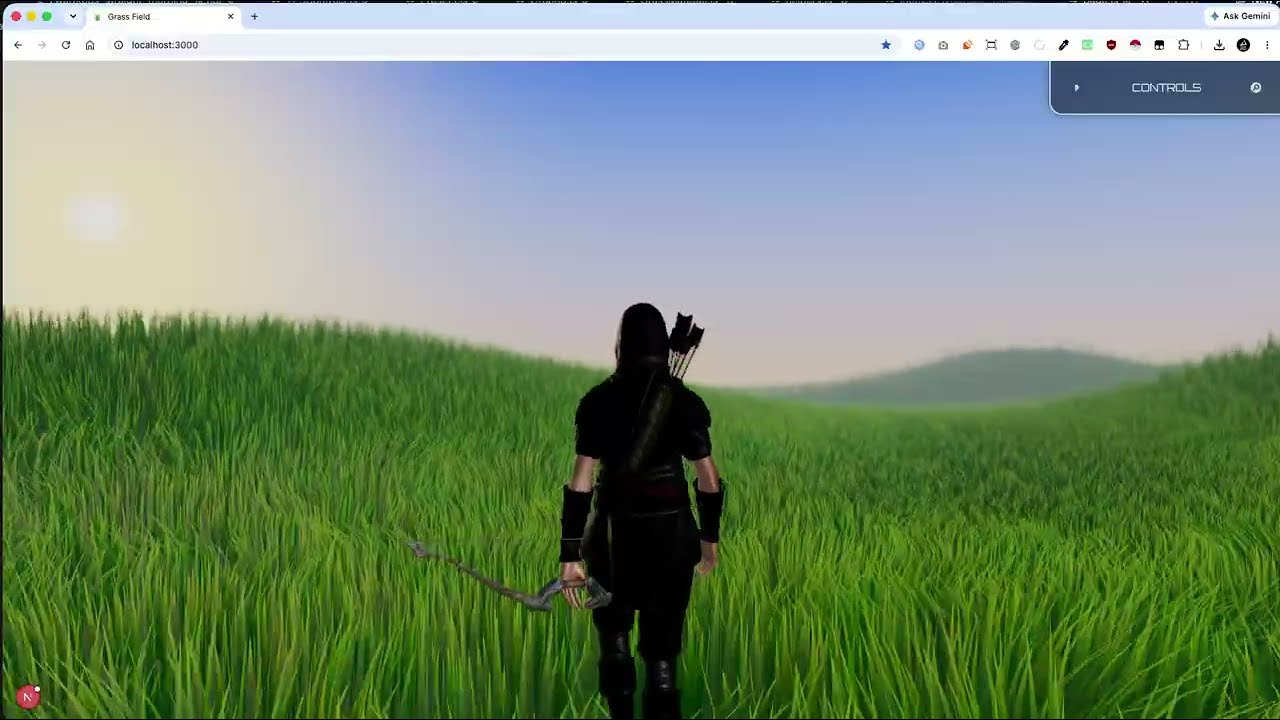
I have been working on my grass system these days. Since WebGPU has become very stable and the support for it is out there in most of the browsers and the devices, I planned to migrate my grass system to WebGPU for better performance.
But during the migration, I ended up completely overhauling it. It is much more complex than before and has much more fidelity than the previous grass system I built. WebGPU and TSL gives so much flexibility and I believe there is a lot than can be done to improve it more.
I am now planning to make it into a complete Grass Plugin for Three.js that developers can use in their projects to get amazing looking grass and rich environments. I have many things planned out for it.
Currently, I am working on the lighting of the system. Previously, it was just gradients in shaders that I manipulated to make it look like different kinds of grass. But now, I am working on a proper lighting system that is able to illuminate the grass blades for different environments. I have made some presets as well to show the capabilities of it.
The next thing on my mind is to optimize it more. As I believe, having very dense and realistic looking grass will need a lot more blades and I need to do a LOD system in order to make that kind of grass run on all devices.
I will be working on this regularly now and will be sharing updates here.
I’ve been making steady progress on my procedural grass plugin, and here’s what has been added since the last update:
Terrain support: grass now adapts to any terrain mesh.
Created an LOD system with seamless crossfade transitions.
Added a tiling system that allows the grass field to extend to virtually infinite distances.
Added per-blade frustum culling for visible tiles to reduce fragment shader work.
Interactive grass that reacts to multiple moving objects (currently up to 8 at a time).
Improved lighting for a more natural appearance.
The plugin currently generates grass using individual blades, which produces great results but also has practical limits. I’m considering adding an optional billboard-based grass system for scenes that require extremely dense vegetation, similar to what Kingdom Come: Deliverance 2 achieves.
Here’s a short progress video showing the latest additions:
A live demo will be coming soon.
I’d love to hear your thoughts. If you’ve worked on large-scale grass or vegetation systems in Three.js or other engines, would you recommend continuing to optimize the individual blade approach, or is adding a billboard system the right next step? Any suggestions or resources would be greatly appreciated.
I recall seeing papers or presentations from AAA game titles that address this issue; you can apply those techniques to achieve better performance and visual quality.
Thank you for your replies. I have been studying the grass system of Ghost of Tsushima.
I thought to improve the current look of my grass system even more before moving on to adding an alternate billboard grass type to my plugin.
I have improved it a lot and I think it looks quite insane for something running in a web browser.
I tweaked the colors, improved the wind system and also added specular highlights for extra realism. The result is miles better than before.
I will now implement an alternate billboard grass system. The tiling, culling and lod system should remain same. The only thing I have to change is the geometry generation and the material. I will then move on to a terrain painting system that should allow painting both types of grass. Let’s see where I get with that.
I successfully implemented billboarding grass as an alternate grass type.
It reuses the existing material with a few tweaks and has a completely new geometry.
This makes it work seamlessly with the LOD and tiling system I already have. So, the switch is basically changing the geometry and material of the tile mesh.
Billboarding grass gives much more denser grass at a very low cost than the blades. The blades have their own charm, but if someone wants more performance, they can use this.
I also did some optimizations to the whole system and now it is running at locked 60fps at 1440p on a M1 Mac with both grass types. Previously, it had around 40 fps at 1440p.
I will now move on to the terrain painting system. After that, I think the base plugin would be pretty much complete and I will prepare a demo for you guys to try and start a waitlist for the plugin.
Finally implemented the terrain painting system. It can paint grass over the terrain and supports both grass types.
The terrain painting can be saved as a jpg texture which can be loaded again to get the same result. It also supports custom textures. If someone wants to create their own in Photoshop or procedurally generate it, it works with that as well.
I think the basic features and customizations for a grass system are pretty much done. I will now be working on refining it a bit more and preparing a demo for you guys to try and launch a waitlist.
Have you tried rendering the depth first (a cheap single pass) and then using that depth data for the color pass? It’s a very effective way to avoid overdraw during the pass where lighting and colors are calculated.. Even though that effectively doubles the triangle count—though it’s worth it if you want beautiful grass.Of course, techniques like culling, indirect draw, or LOD are essential
This is a good idea. But most of my work is done in vertex shader in order to make the grass look natural. The fragment shader isn’t very complex. Doing this would increase vertex shader load which might result in a performance drop rather than a gain. I believe it’s not worth trying.
I have been doing many other optimizations and as of right now it is in pretty good shape. I am able to run it with locked 60 fps on a M1 Mac mini at 1440p.
You might want to try out what @Anh_Tuan mentioned. A depth prepass can be useful in this situation given it helps avoid overdraw, both pixel and in a way quad overdraw. It’s worth giving a try and seeing if you gain any performance.
60FPS at 1440p is great, but most games will have way more than what you are using for testing.
Yes. I tried it, it will be more economical when the colors of plants require more complex lighting calculations (whether static or dynamic). But if it’s just for textures, it’s not worth it. This is where I got my reference: Between Tech and Art: The Vegetation of 'Horizon Zero Dawn'
Thank you guys for the suggestions and references. I’ll give it a go in an isolated environment so it doesn’t take very long and I can test if there’s a difference with my system.
I’ve already started working on a demo to show the capabilities of my plugin. This is what I’ll be launching the waitlist with. I’ve finalised the terrain and the overall map for it. I have plans to add many things to make it a lively world. Something like Ghost of Tsushima.
Nice, see for yourself if it works out. And if you don’t gain any performance, please share here still. I’ve had mostly positive results with manually depth prepassing, but I’m curious what others find.