Hi,
I have a problem with my NormalMaps that I just can’t solve…
The NormalMap was created in Houdini, baked from highpoly to lowpoly mesh. The texture looks clean. Normal is displayed correctly in Blender:

Exported as GLB or GLTF the model looks like this:

Very strong, faceted artifacts become visible in the NormalMap. I loaded the model in modelviewer and https://gltf-viewer.donmccurdy.com/ - same result.
When i reimport the GLB into blender, extract the normal texture and adjust the levels, I can see the artifacts in the texture:
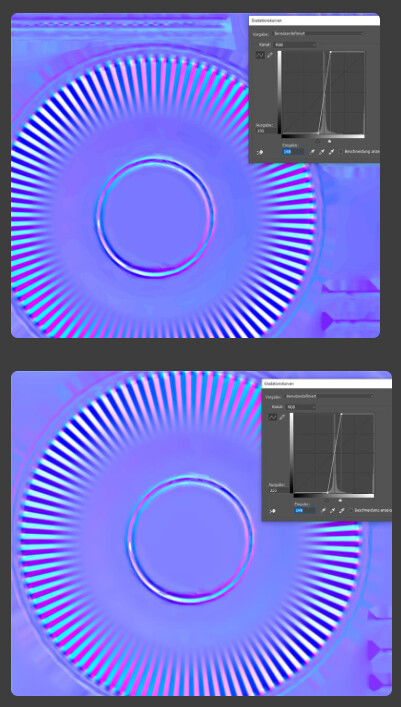
So i thought this is some kind of compression of the GLB. I tried exporting GLTF with external (uncompressed png) normal texture - but the result is the same when I upload this model in the viewer.
As a comparison, I exported a NormalMap from a GLB Example Asset and placed both NormalMaps on a plane. I can clearly see that my custom NormalMap has strong artifacts while the example NormalMap looks pretty clean.

I’m kind of at a loss here…