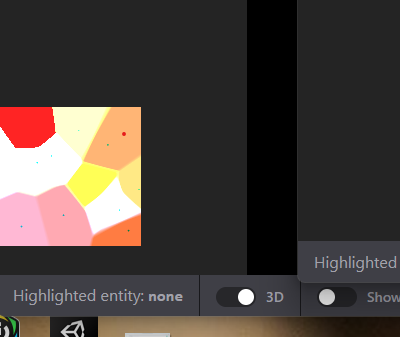
I am trying to render a distance field using some spheres to a 3d render target.
i am setting the render target with setRenderTarget(target,layer). I get this weird result when trying to render a slice through the texture in my canvas. I don’t see the result but instead what i think, should be the result (the voronoi looking thing) is flashing all over my chrome. Like outside of canvas, in other windows, even in vscode.
In firefox, it seems to be contained in the canvas at least, (bottom left coner) and i cant seem to take a screen shot of it.
That’s similar to what I saw. However, the mispaint was black (like default css text). The mispaint was “contained” to the area of the element which I targeted for a texture (a rotated form). The mispaint was filled splotches which flickered near the controls on pointer events. Of course, I was redrawing on events, but not back to the source form. If I hard-refreshed the page, there would be new splotch shapes in the same area with roughly the same visual weight.
This seems to be a bug in the underlying WebGL implementation - you can see a Chromium issue here. If you’re seeing the same issue I recommend +1-ing the bug and maybe reporting some system stats. I suspect rendering to 3d targets is one of the lesser-used portions of the WebGL API.
In terms of work arounds I had success in rendering to a 2d render target and then copying that data to a layer in the 3d target.
Is this a recent development? Because I was seeing some framebuffer artifacting on existing webGL stuff last week… maybe someone stuffed something on the ANGLE team…
Ouch. I just tried it and it halved my frame rate. Granted, i just slapped it on top of my manual trilinear filtering, but still quite a hit. Will it save me from doing the trilinear manually a bunch of times in my loops and while searching for normals sufficiently that this cancels out?
At this point, im more inclined to just arrange the 3d texture myself in a regular old 2d target, that way i could render all the slices at the same time.
I figured that wouldnt work since my target is not power of two, but worth double checking.
I was thinking, if i need to render each slice of the array texture, plus theres overhead on moving the data to a 3d target, why dont i just arrange all the slices in 2d textures, and just draw a couple of times. Eg place quads each with its own slice value and render them all at once.