There is a whole bunch of issues in your scene - in particular you are using a total of three different versions of three.js. Probably should avoid that - use skypack instead:
import * as THREE from "https://cdn.skypack.dev/three";
However, once I’ve tidied everything up it seems like the issue does persist. The right hand scene (with postprocessing) is brighter and the effect becomes more obvious the more transparent the material is.
@Mugen87 do you know what’s going on here? There’s no cube camera involved like in CubeCamera washes out the colors · Issue #18942
The scene is just a cube with a MeshBasicMaterial, black background, no lights.
Left, no postprocessing:
Codepen
material.transparent = true;
material.opacity = 0.25;

texture.encoding = sRGBEncoding;
renderer.outputEncoding = sRGBEncoding;
Right, with post.
Codepen
material.transparent = true;
material.opacity = 0.25;

texture.encoding = sRGBEncoding;
renderer.outputEncoding = LinearEncoding;

effectComposer.addPass(new RenderPass(scene, camera));
effectComposer.addPass(new ShaderPass(GammaCorrectionShader));
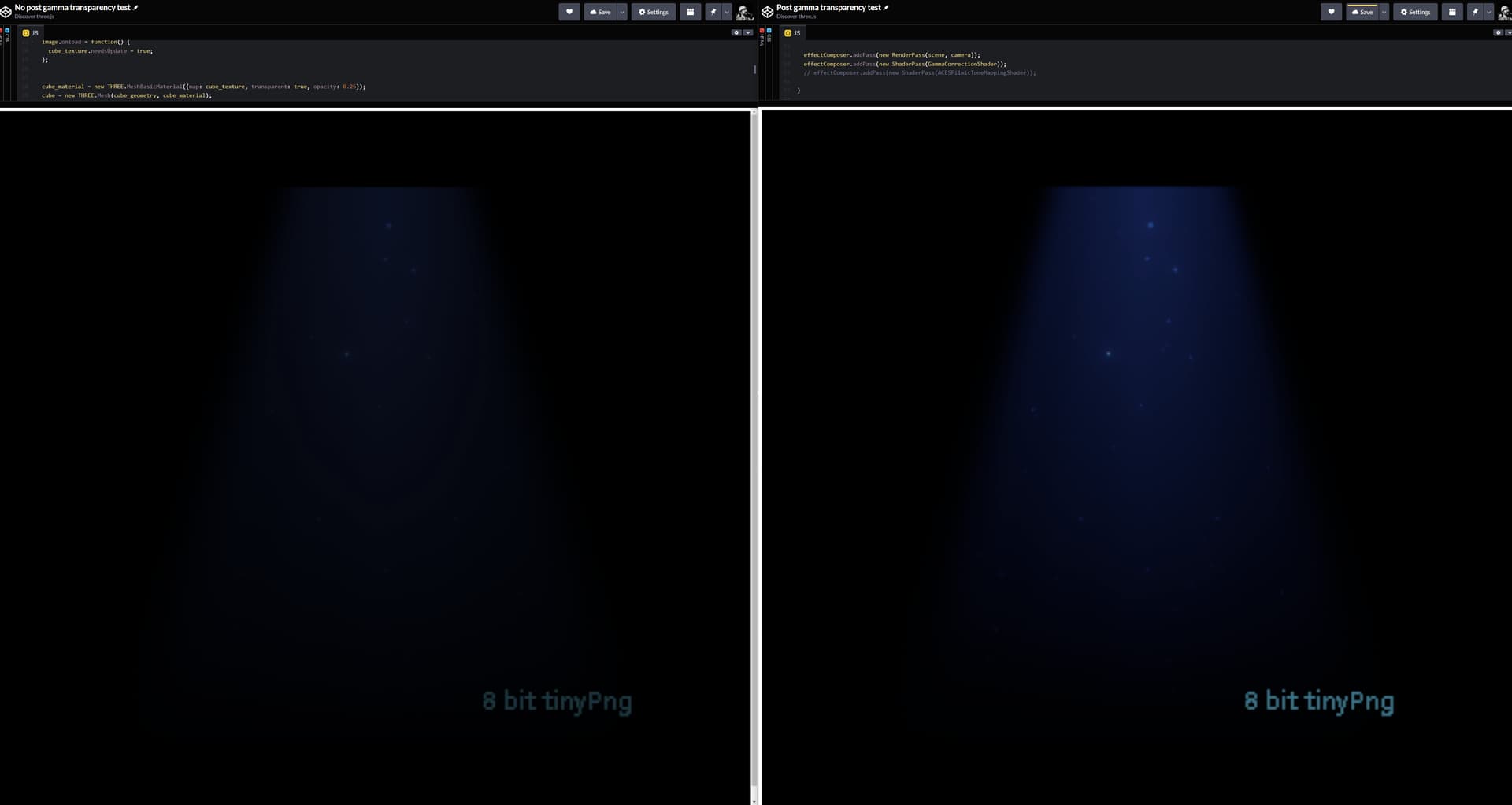
Now when I change only material.transparent = false in both scenes, they appear to match - I didn’t use an image differ or anything but they appear identical.
