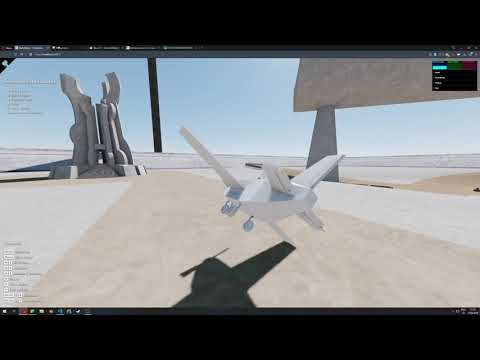
I tweaked my flight model values a bit and I’m pretty happy with the result. My model is definitely more arcadey than realistic (especially when I’m landing at the end ) but I like it.
In the beginning (0:10) I rapidly press up / down buttons to show what how my model behaves compared to yours. I think you should add some sort of input smoothing so that your model doesn’t react as immediately as when I rapidly moved my mouse up and down in your demo. Just my opinion obviously.
Yes, I like your flight model too. It looks like you’ve gotten it working just fine and it looks like a lot of fun to fly.
Was the airplane available in your sandbox? I only saw a couple of cars. What controls do you use to fly it?
That’s a good point about my controls. I had set limits on the amount of change, but had not considered limiting the rate of change. The change you propose would definitely make it more realistic and less “twitchy”. (Although the controls on aerobatic airplanes are extremely sensitive, the kinds of planes that I am trying to simulate - including warbirds - are not extremely sensitive and are designed to travel long distances in stable flight.)
It’s on the runway through one of the tunnels, you have to drive to it. Sketchbook 0.4
Controls are displayed in the bottom left corner when you enter the airplane.
Please keep in mind that the live demo is using my old flight model without today’s adjustments. I’ll upload the new code tomorrow.
aerobatic airplanes are extremely sensitive
I think limiting the rate of change would be a nice improvement. Sensitivity is one thing, but surely no real airplane can behave like this?
Yes, no aircraft can do that. In addition to speed of movement of the control surfaces, I can see that I also need to take angular momentum into account, which should resist such sudden changes. (I assume that cannon.js does that for you automatically?) Until that problem is solved, I need to add a placard in the cockpit warning against such violent movements.
placard in the cockpit warning against such violent movements
Good idea.
I also need to take angular momentum into account, which should resist such sudden changes. (I assume that cannon.js does that for you automatically?)
Sort of? All I ever modify is the airplane’s velocity, and angular velocity. Cannon applies the velocities every simulation update, but that’s not difficult:
# Obviously you can do this without cannon
position += velocity
rotation += angularVelocity
There’s no hard limits on the absolute position or orientation of my airplane. I never modify or limit them directly, only through velocity. I think that might be one of the main differences between our models?
I could never perform such sudden changes in your demo. A ridiculous acceleration amount would result in an equally ridiculous reaction, because like you said, my airplane respects it’s momentum (positional and angular). But your airplane can accelerate it’s rotation very rapidly and then stop immediately, which feels unnatural to me.
It looks like the problem is not with ACflyt, but with the way I implemented the pitch animation. I have now loaded a version of the demo with the pitch animation disabled so you can see how ACflyt computes pitch: ACflytModelDemoXP
In ACflyt, you are not inputting pitch directly. This is one of the unique aspects of the program. What you are inputting is the coefficient of Lift (cfLift), which affects the lift vector. ACflyt computes the change in the flight path caused by the Lift (and Gravity) and then, by default, points the aircraft in the direction of flight. (So when you start out on the ground, the aircraft is pointed level since that is your initial direction of flight.)
The conversion of mouse movements into changes in cfLift is handled by the demo program. I was concerned that the program might be converting mouse Y movements into cfLift directly, e.g. cfLift = mouseYdiff * factor. However, the equation I am using is cfLift = cfLift + mouseYdiff * factor. This should be okay…
So that leaves the pitch animation as the source of the problem. In Blender, I created an animation that allows you to pitch the aircraft back and forth - a deflection from the direction of flight computed by ACflyt. Since clLift is a direct result of this deflection, I can use cfLift to back into the required deflection. It could be that I was keying this animation based on instantaneous changes in cfLift rather than on the actual change in cfLift. I will investigate.
I couldn’t tell from your video - was your frame rate over 60fps?
Regarding limits, I believe that ACflyte can accept whatever inputs I throw at it. However, the demo program imposes limits on max cfLift and Bank speed, dictated by aerodynamics, the aircraft structure and pilot G-tolerances. If I removed those limits, our programs would probably perform similarly.
I spent a lot of time developing routines to handle a taildragger. However, cannon.js may be able the handle those interactions as well as other interactions with the ground.
this is so good, im scared of the math behind it, i dont think i could ever do something close to that, but it must be so much fun. i saw an older kenney tweet where he mentioned that for arcade-like drifting he’s just using a sphere and applies directional force: https://twitter.com/KenneyNL/status/1107783904784715788 is the way you handle it much different from that approach?
Yes it’s completely different. I didn’t write it, but I’m using the cannon.js’ raycast vehicle component. I actually suspect cannon’s creator just ported the component from bullet, but I don’t know for sure.
It has a raycast for each wheel and does a lot of complex math to simulate suspension, tire grip etc. I just used it since someone did the hard work already.
After all that soul-searching and reviewing my code, I ended up simply decreasing the sensitivity of the MouseY axis (“pitch”) - which has the effect of limiting the change.
That animation is great! Certainly eliminates the need for a door.
Is your program going to incorporate mouse controls? Some people are great with keyboard controls - not me. Also I am left-handed, so something involving a combination of mouse and arrow keys works best. I would suggest a trailing camera, so that when things move, the camera automatically falls in trail. You could even use the mouse as a primary control, on both 2D surfaces and in the air.
Finally, I was reminded that you have some great looking water. You ever going to add boats bouncing around in the waves? Many years ago, I designed several vehicles for the MS Flight Simulator. Since I enjoy pushing boundaries, most of the vehicles I designed were boats, which proved very popular. I spent a lot of time trying to create animated waves - and now you have them at your disposal!
I look forward to seeing your future additions and improvements!
I don’t know if you have done any work on this lately.
I recently figured out how to “bank” the camera (you have to eliminate the lookAt command).
So now you can add a cockpit view where you pitch and bank along with the aircraft (or other vehicle).
Create a pivot object, link your camera to the pivot and add the pivot to the scene.
Position the pivot at the center of what ever object you are in.
Position the camera where your head would be relative to the object center.
As you move, rotate the pivot based on the new rotation of the vehicle.
You can also rotate the camera to look in different directions (left/right) as you are flying/driving.
You can also eliminate lookAt in your external view, so that you can pitch and bank along with the object as it flies or tumbles.
Thanks. I’m proud of my helicopter physics, but airplane was really a lot harder than I expected.
Someone took a shot at rewriting my airplane physics. Their code looks a lot cleaner.
I haven’t tested it properly though and I’m not actively working on Sketchbook right now, but I did intend to merge their code if I ever get back to working on Sketchbook.
This is strange. Helicopter physics is much more complex than airplane physics. Of course, it all depends on the level of abstraction and the assumptions made.
I must have missed the helicopter flight. Is it in this branch? As I see it, phil_crowther was doing something on the plane. At first glance, he presented the theory correctly. It didn’t work?
Yeah my approach is completely abstract and my goal was to create an arcade-style physics, preferring ease of use over realism. My helicopter isn’t at all realistic, but I like how it feels to fly it.
Phil seems to have a very different approach, and from what I’ve seen in his demo I wasn’t interested in porting his model over to my demo. Far too realistic for my needs and seemingly completely different philosophies in how we compute and apply physics.
phil_crowther was talking about rather complicated things. If you are not going to implement specific modes, such as slow speeds and stops, then it makes sense to make a very simple physics model.
If I understand correctly, the user does not have a dashboard with flight parameters. In this case, it is not so easy to even notice the lack of angle of attack.
In the video, in-flight stops are implemented. But even for these cases, you can make simple arcade physics.
Visually, the physics will be bad if some simple rules are broken. For example, these are maneuvers with an excessively small radius of curvature of the trajectory. Also noticeable are U-turns with a roll of about 90 degrees without loss of height.
I made a small rework of the flight dynamics model based on the Inzanity’scode.
In my opinion, this version is superior to the basic one in simulating an airplane. Of course, like the basic model, my model is far from the level of realism of hardcore simulators.
In the near future, I plan to present a list of the key inaccuracies of my model. Some of them can be eliminated without reducing the controllability. But the remaining inaccuracies are necessary to ensure the simplicity of the game.
I would love to discuss here a way to provide a compromise between arcadiness and realism.
Below is the list of the key inaccuracies of my flight dynamics model. The implementation of this model is available in the game via the link in the previous post.
Speaking about the inaccuracies of physics, we are forced to compare the model under discussion with a certain standard. The reference point will be a model that would provide a good simulation in a flight simulator.
It is important to note that the simulator does not provide perfect simulation accuracy. A good model only simulates the properties that the player is able to notice. The error of the ideal simulation model is within the limits of human perception thresholds.
A truly correct model can be compiled from fundamental sources, such as Charles E. Dole “Flight theory and aerodynamics” or John J. Bertin “Aerodynamics for engineers”. Our analysis will be much simpler.
Having marked the upper limit of accuracy, we give the list of notable shortcomings:
The model does not take into account the flight altitude at all. In real-world aerodynamics, altitude is a significant factor. The behavior of the aircraft in the model does not change during climb. Special behavior is implemented only in the mode of movement on the surface of the earth.
The model does not take into account the factor of fuel. A real airplane in flight consumes fuel and becomes lighter. The model can’t run out of fuel. Fuel is not consumed. The weight of the aircraft is not reduced. The position of the center of mass of the aircraft does not move.
The aircraft’s reactions to the player’s input of ‘W’ / ‘S’ are simplified. The real transition process that occurs when the elevator is deflected involves a change in the angle of attack and the resulting further changes in dynamics. In the model, pressing ’ S ’ under all conditions gives an instantaneous increase in lift, depending only on the current speed.
The aircraft’s reactions to the player’s input ‘Q’ / ‘E’ are simplified. The actual transition process that occurs when the rudder is deflected involves a change in the glide angle and the resulting further changes in dynamics. In the model, pressing ‘Q’ under any conditions gives an instantaneous increase in lateral force, depending only on the current speed.
The aircraft’s responses to player input ‘A’ / ‘D’ are simplified, as in points 3 and 4. But the aileron deflection is the only case where this model is relatively good.
The model does not take into account the jet and gyroscopic moments of the power plant. The behavior of a real aircraft is affected by these factors, which is especially noticeable in some modes.
These shortcomings do not allow us to talk about the imitation of a particular aircraft. Nevertheless, if we talk about realism, it is necessary to have some kind of goal. In this capacity, it would be correct to consider the similarity to sports aircraft, such as the Extra 330SC.
The disadvantages of the model listed here are formulated from the point of view of the developer. But this is not the way to describe it, which will improve the quality of the game. To correct the errors, we should first see inaccuracies through the eyes of the player.
We need to determine in which conditions there is weak realism, and what good realism means for these conditions. After that, we will be able to assess the acceptability of improvements in terms of controllability maintaining.
 ) but I like it.