How do I fix this alpha blend darkness

I have a transparent beard with a simple alpha setup on blender.

When I load it in threeJs and have it over another mesh. For example see below for the beard on a face. The gradient shows dark when over another mesh.

I set receiveShadow and castShadow off with no help and I also noticed that depending on the base skin color (light / dark skin color) the gradient looks a bit different but is still darker.
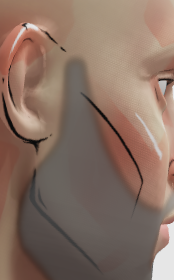
Is there a quick solution or is it a deeper issue (eg: material setup)

Tried playing around with the material to no success, any ideas?

Not really obvious to me what geometry or materials you have in three.js, I think you’ll need to give more than screenshots if you want help on this one. Would suggest maybe cutting a slice of the .blend and the resulting .glb (assuming you’re bringing this into three.js via glTF exporter?) and sharing both files if possible. Also… does the same issue appear for your model in online glTF viewers?