I’ll have to double check, but this shouldn’t be true.
Just to do a sanity check:
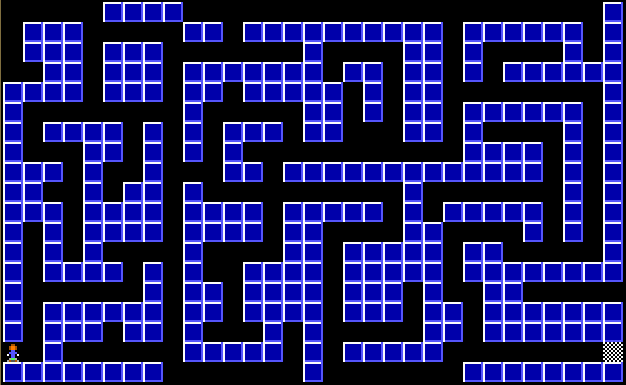
You are having trouble rendering something like this, at 60fps? If so, I see no reason to use frustrums, and especially not occlusion culling.
Nah, I just posted that as a roughly similar visual example of how such a “map” would look like - it has no connection with the OP’s envirnment, just some image from the web. That being said, the structure of the OP’s map might look similar to this, which is why I posted it.
For the record, I didn’t refer to objects culled by the camera far plane here, but to objects that are inside the viewing frustum, yet “behind” other objects (and to the Three.js rendering process, that generally starts from afar to close by, though not sure if this is true only when it comes to transparent objects or it goes for all). In other words, occlusion culling. As far as I know, there is no direct connection between frustum culling and occlusion culling, they’re two relatively separate things.
Actually, you don’t have to necessarily merge geometries, if the material issue is a problem. Merging geometries would be useful to reduce the number of draw calls, but if it’s the sheer size of the map that’s the culprit and not the number of draw calls, you can very well skip merging geometries and keep walls separated.
It depends on the structure of your wall array, but, for example, if you have a map where walls are located according to the geography in their array, say in a two dimensional array (the 3rd dimension, aka Y or the wall height, not included, since it’s a feature of the walls and not the wall “arrangement”) similar to this:

where reds are the rooms and corridors with walls at their edges, then you can have your coordinates array the size of the map, but only a 24 sized array of coordinates corresponding to the walls that are always rendered (except null aka inexisting walls, obviously). That array of coordinates would be updated according to the player movement, via a pseudocode like:
chunk = chunks[trunc(cameraX / 30), trunc(cameraZ / 30)];
for each non-null wall in chunk, render wall;
This assumes a grid-like structure for your walls, of course, so some adjustments based on the actual structure might be needed. The main idea here is that you can always render the same number of potential walls, without merging them, and only update their coordinates according to the player movement (e.g. if player moved from chunk[0, 0] area to the chunk[0, 1] area, update chunk aka your rendered area, with the chunk[0, 1] wall coordinates).
Naturally, a chunk can be of any size, the above was just to get an idea of what I was thinking…
OK, here is a map that slows down on rotation, it’s a rather large map, i’ve captured the geometry from dev tools and put it in as an array (rooms + walls).
Walkaround-2.zip (163.1 KB)
Thanks
Nice work! Here is an image that explains what happens, based on my initial tests:

This also explains why reducing the viewing frustum, aka the
camera.far value, alleviated the problem, since these geometries “behind the walls” were probably partially excluded from the frustum as a result.
Makes sense, that is what I thought was happening it was still drawing the geometry inside the frustum even though not “visible” to the player.
So for the chunk method, would it not take more time to work out each frame what is visible to the player? Would it be “better” for both GPU and CPU to leave the FAR plane at 100 and add “fog” at that distance so it doesn’t look odd if the player looks at something that isn’t drawn? I have loaded several maps and cannot see any weird happenings at 100 FAR setting so I think it must still be far enough away to not cause issues.
Is there something clever I could do with the raycaster to see what it “sees” and just draw those geometries?
How would be best (not something I have ever done before) to set about “chunking” the map and rendering only certain ones and how would one render the other chunks, is it based on the player position?
Thanks
Actually, you’re right, building the map based on chunks would involve some effort and will probably have some other effects and requirements, like updating things to a new chunk when the player passes a chunk boundary. So, I’m thinking that dynamically adjusting the camera.far property based on the maximum distance in the current room (i.e. sqrt(roomwidth^2 + roomlength^2)) if you exclusively want that area to be rendered, or, just a reasonable distance that won’t potentially involve many geometries would be easier and better.
If you go the dynamic camera.far variant, you could indeed alternatively use a ray cast from the camera (world) position to the camera (world) direction and add a safe value to the intersect point distance (say, the thickness of a wall, or something similar) and work from there. I’m not sure of the effects of having a dynamic camera far value would have on the visuals, but you can try it, as there’s nothing to lose and the procedure is simple. And of course, if this has whatever drawbacks, you can easily revert to the fixed (but reasonably low) camera far variant.
So, yeah, you can forget about splitting your map into chunks - not because it’s hard to implement in itself, but because it would most likely require a map structure based on geography (or latitude and longitude in the XZ plane, so to speak) and that might not be entirely compatible with your current map structure, as grabbed from the data files you mentioned.
By the way, you can use the raycaster for more than just the above. You can also use it to prevent the player going through walls, by cloning and inflating a bit your geometry, set the camera or the corresponding vector used as the raycaster origin back a bit, and using the intersection point with the clone as a reference of where to stop (if you disregard the artefacts or the fact that the code isn’t yet polished properly in the online version, the fiddle in one of my earlier replies shows how I do it for my globe, in the raycast() function). Of course, that won’t be necessary if you decide to prevent the player going through walls via the player and the walls coordinates, which is probably easier to do (not that the raycaster method is complicated in itself).
Other than that, I explained how I see the chunk system in one of my previous replies. Basically, if your map is 100 x 100 units overall, you’d make chunks of say, 10 x 10 units wide so 100 in total, and render a single chunk based on the player coordinates (e.g. if the player is at position 58, 34 then you’d want to render only chunk[5, 3] and not anything else, since that is the current chunk). The way I was thinking at the time of my previous reply was to only update the wall coordinates for the current chunk, followed by re-rendering it, in other words not create any Three.js objects other than those within the current chunk, and keep the other potential chunks only as an array of (wall) coordinates, in order to speed up the process.
Yes, can the camera change the far plane “on the fly”? I wasn’t sure if that would be good practice, not sure if that equation (sqrt(roomwidth^2 + roomlength^2) would be very good for interconnecting rooms would it? Especially for corridors or tunnels, if a static value works (which it seems to thus far) I am happy keeping it to static of 100 unless there is a performant reason not to?
I haven’t implemented collision yet, I wanted to get the geometries sorted first, got to try and texture this thing next!
I have no idea if changing the far plane on the fly would work, but you lose nothing if you try (say, on a key press, to make easier to see the effects it has). Good practices are only “good” for those used to follow them, if there are no drawbacks for something, then being considered good practice by some is more or less irrelevant and a matter of (relatively shortsighted) preference. Progress comes from trying all kinds of things, not by stagnating in a set of norms that are considered “appropriate”.
Indeed, that equation becomes useless for more complex geometries that are not necessarly rectangular in nature - good point. I mentioned that for the cases (if any) where the 100 value for camera far might not be enough, or you’d want to be very strict with the area you render. If you’re ok with the 100 value and don’t have longer corridors or tunnels that might be culled because of that, I see no reason not to use it. 
It’s a good approach to think about other things only when you’re done developing the current objective the best way you can. For sure you need to try and texture the walls next, because it adds to the workload and you can then test things at their “maximum capacity”, so to speak. The aim should be to get the “normal” performance impact even after adding everything you can to “stress” the environment - that way you’ll be sure it works properly for the future, and you can safely proceed further knowing that what you’ve done is in its best version.
In terms of “seeing” beyond the far clipping plane, I would introduce fog to the scene so it doesn’t look quite so sudden when drawing the objects from a distance that suddenly or noticeably come into view.
Well at least it’s good to hear that there isn’t much (simply) I could do to improve it further at this stage.