I decided to try to build a color picker that I had been thinking about for a long time.
The idea is that if the hue is spread out on the equator and lightened towards the north pole and darkened towards the south pole, theoretically, with the right settings, I can access most colors by rotating a single sphere.
I am not entirely familiar with the potential losses, and since I am not an expert in this field, I can only find out by actually drawing.
I managed to build a prototype, but there is a surprising difference depending on the version of three.
The object consists of one sphere mapped with color and another one just above it with a gradient from white to transparency (at the equator) and to black.
The final color is extracted from their combination.
The idea of a single manipulator for the most of color sounds good for me in theory.
Below are two files with identical code, but different versions: r128 vs r180.
The 128 version works much better.
Claude mentioned something about a difference in “depth write,” but I can’t trust him too much, and besides, it doesn’t mean much to me. Before I go any further with this, I would like to understand what has changed.
Better looking r128 version (especialy around blending dark)

https://codepen.io/bartek-biernacki/pen/pvgXxLm
r180 version
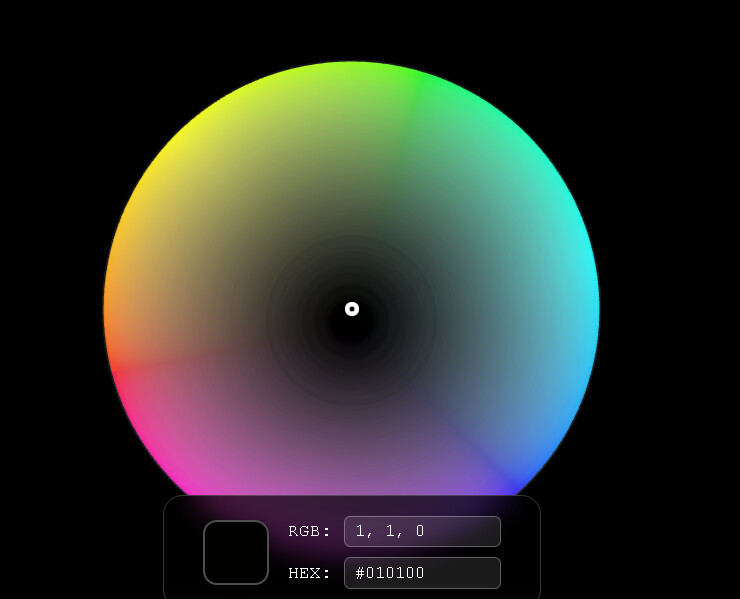
https://codepen.io/bartek-biernacki/pen/VYeowgV
Any help or information about similar solutions would be greatly appreciated.
Thanks in advance.
Oh. no idea why it is loading surprisingly long for a quite simple object like that but… everything in its’ time I guess. 