Hi everyone,
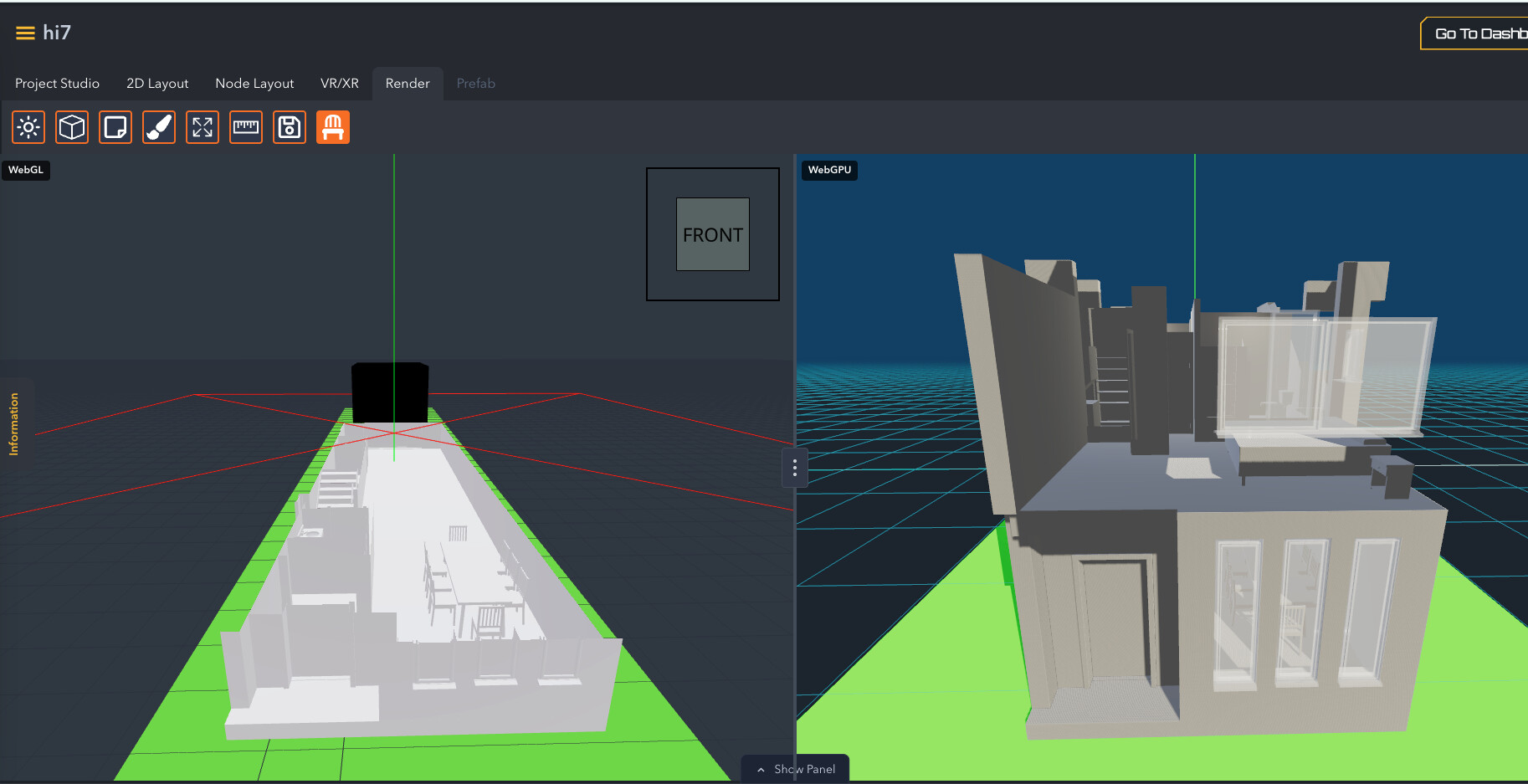
I’m building a side-by-side WebGL and WebGPU renderer using Three.js to compare behavior between the two. The WebGL version (left side) is working perfectly, including clipping planes. The WebGPU version (right side) is where I’m running into issues.
Both renders use the same scene, camera, and clipping plane logic — the only difference is the WebGPU-specific implementation details.
I based my WebGPU clipping implementation on the official Three.js example:
https://threejs.org/examples/webgpu_clipping.html
In that example, the red box acts as a draggable clipping plane, and when it’s moved down it clips everything in the scene as expected. That’s the exact behavior I’m trying to replicate.
What’s working
-
WebGL clipping behaves exactly as expected.
-
The red box correctly clips the entire house model on the WebGL (left) side.
WebGPU issues
-
Clipping only affects part of the model
-
In WebGPU, I’ve added all meshes to a
ClippingGroup, following the example. -
However, only the roof is being clipped — the rest of the house ignores the clipping plane.
-
-
Camera zoom causes unexpected clipping
-
When I zoom the camera in, the WebGPU side of the house itself starts getting clipped, even though I’m not modifying the clipping plane.
-
This does not happen on the WebGL side and seems tied to camera distance or depth behavior.
-
-
The red Clipping Plane on the webgpu side is rotating
-
This isn’t a huge bug, i think i can figure this one out but i thought i point out if people had questions
-

In the image below you can see on the left side the clipping plane is on the bottom and whole house it gone. I want it to be like that but the right side the webgpu implementation only the roof of the house is clipping.

Also when I zoom in it also clips the house more for some reason, I’m not sure why the camera is doing this. Again i want it to look like the left side, the right side is webgpu.