I’ve been using logarithmic depth buffer in three.js for both WebGL and WebGPU for a while, and it works great for eliminating z-fighting at large distances.
But beware…if you have logarithmicDepthBuffer enabled, and you are rendering many overlapping objects in your scene (for example, thousands of grass/foliage sprites on a terrain), you will incur a noticeable decrease in performance!
I did some testing with and without logarithmicDepthBuffer on my terrain scene (with thousands of foliage sprites in InstancedMesh objects), and having it enabled makes rendering go from ≈65fps to ≈35fps, almost a 50% reduction!
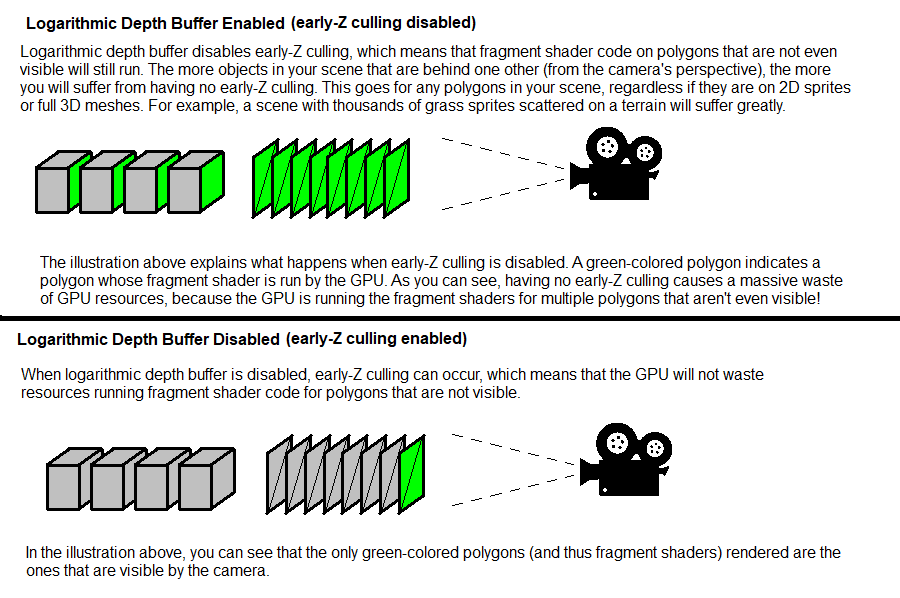
This is because logarithmic depth must write to gl_FragDepth (GLSL) and frag_depth (WGSL) in the shader, which disables early-Z testing. When early-Z testing is disabled, all grass sprite fragments will run regardless if fragments are occluded, resulting in massive overdraw!
Be sure to switch to reverse z-buffer when it is implemented in three.js!
Here is my scene and the FPS with logarithmicDepthBuffer enabled and disabled:
Just a side note that doesn’t invalidate your general observations:
This doesn’t mean anything. An fps reduction of 20% can mean that it went from 500 fps to 400 fps, which is a nothingburger. It can also mean that it went from 60 to 48 fps, which would be a significant reduction: Going from 500 fps to 400 fps is a difference of 0.5ms. 60 down to 48 fps is a difference of 4.2 ms – 8x as much.
It’s best to measure performance in terms of time per frame, never frames per time. fps is a lousy measure when you want to compare performance.
I reworded my original post to include raw FPS numbers. I also added some before and after screenshots of my scene to show how much of an impact logarithmicDepthBuffer has.
You are right, I did exactly what u did but it failed miserably, instead of removing the logarithmic buffer I removed the vegetations and trees. The logarithmic buffer is more important to my large scale environment than the sprite of trees, animated impostor NPCs and grasses.
That’s interesting as I happen to be working on creating “medium resolution” 3D trees (no sprites) for my flight demos. It’s been a real challenge since most 3D models of deciduous trees are either too detailed or too blocky. I have finally gotten a version that is down to 1016 triangles and I can probably reduce that count a little further.
Would 3D trees be affected by the log Buffer? Here is a static demo. The trees don’t have to be perfect since I will generally be flying past them at 100 mph.
Note that I am using a flat plane to create the shadows, which are only 2 triangles each. A computed shadow would have hundreds of triangles.
Yes, disabling early-Z culling (by enabling log depth) affects ALL polygons, regardless if they are part of a sprite or complex mesh. I just emphasized “grass sprites” in my original post since they usually exist in high numbers in a scene.
When reversed z-buffer is supported in three.js, you should switch to that. It accomplishes the same thing as logarithmic depth, but without the performance penalty.