I have a lightweight browser-based billiards game and I want to improve the ball material. I think billiard balls must be the most well-known rendering challenge, but I’ve arrived at a material that seems to have limb darkening. Any suggestions?
browser demo
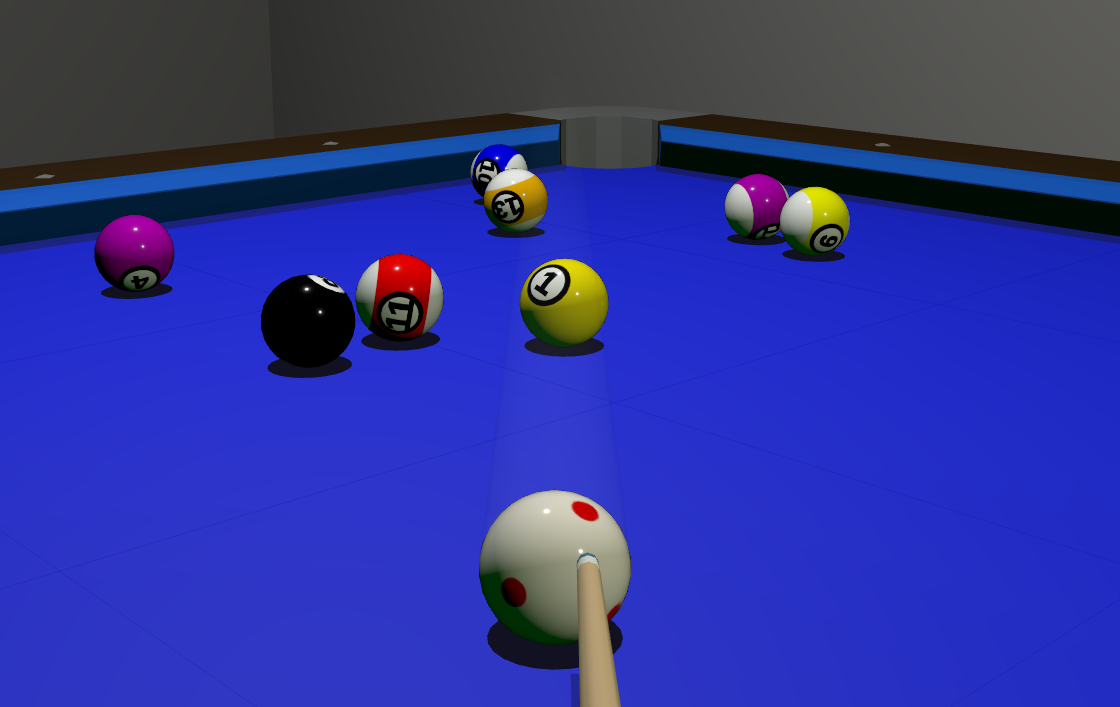
Current:
const material = new MeshPhysicalMaterial({
      color: color,
      roughness: 0.1,
      metalness: 0,
      clearcoat: 1.0,
      clearcoatRoughness: 0.02,
      reflectivity: 0.25,
    })
Tried to create a set of balls from scratch.
InstancedMesh of SphereGeometry and MeshPhysicalMaterial.
Material’s setup is:
      new THREE.MeshPhysicalMaterial({
        metalness: 0.5,
        roughness: 0.9,
        clearcoat: 1,
        onBeforeCompile: shader => {...}
      })
Also, there are scene.environment with intensity of 0.25, and DirectionalLight right above the “table”.
As a lifelong pool player, both look fine.
I like prisoner849’s example because the textures are more familiar and, most importantly, it is brighter. As he indicates, there is normally a fairly bright light hanging right over the pool table.
And the balls would be very smooth and hard (so they roll smoothly). Are roughness and metalness options with MeshPhysicalMaterial? I suspect the clearcoat is playing a big role in defining their appearance.
ALSO
I didn’t notice that there was a game to play. So I tried that. On the break, I sank the 15 ball in the right corner. While satisfying, that means that whoever racked up the balls did it wrong because you shouldn’t be able to sink a ball on the break with a straight shot dead center. I have seen players sink balls on the break but they always hit off-center and probably used a bit of “English” on the ball. Since pool is geometry, fixing this problem probably just involves moving the rack forward or back a bit.
I downloaded your repo locally and played with it a bit.. I wanted to add an 8ball mode but didn’t get there…
But I noticed you had:
renderer.setPixelRatio(window.devicePixelRatio * 0.5)
Which is why it looks pixelated on desktop browser…
Would be nice if you changed that to:
renderer.setPixelRatio(window.devicePixelRatio)
or even just 1 i think.
Or at least gated based on desktop vs mobile.
Regarding getting a more realistic material.. you probably want to add an enviroment map to get more lighting detail.
Hi @prisoner849 and @tailuge …
I made two attempts to create balls with printed numbers.
One with a shader, with the help of Jee Peetee, and another with canvas and a direct image on the sphere, where the last two, using canvas or a direct texture on the sphere, resulted in the same finish.
I would like to learn how your wonderful spheres were made, because I haven’t been able to achieve the same result.
PS: The correct titles of these two pages are ball_shaders.html and ball_canvas,html.
Thanks, your render looks much nicer, I did try your material but it didn’t make much difference to mine scene - I think my black edges come from using Icosahedron (lod=4) which you can still see when close and somehow this and no subpixel resolution leave me with edges. Also your whole scene and lighting is better.
I only hack at this, I think @prisoner849 will have best advice. My texture map is just from one side. Check out full source on github/tailuge
Here is the projection
    material.onBeforeCompile = (shader: any) => {
      shader.uniforms.numberTex = { value: numberTexture }
      shader.uniforms.invScale = { value: 1 / (R * 2) }

      shader.vertexShader = shader.vertexShader.replace(
        "#include <common>",
        `#include <common>
         varying vec3 vLocalPosition;`
      )
      shader.vertexShader = shader.vertexShader.replace(
        "#include <begin_vertex>",
        `#include <begin_vertex>
         vLocalPosition = position;`
      )

      shader.fragmentShader = shader.fragmentShader.replace(
        "#include <common>",
        `#include <common>
        uniform sampler2D numberTex;
        uniform float invScale;
        varying vec3 vLocalPosition;`
      )
      shader.fragmentShader = shader.fragmentShader.replace(
        "#include <color_fragment>",
        `#include <color_fragment>
        // Calculate the base UV mapping
        vec2 projUv = vLocalPosition.xz * invScale + 0.5;

        // Capture derivatives BEFORE the flip.
        // This prevents the GPU from seeing the 'teleport' at the equator.
        vec2 dx = dFdx(projUv);
        vec2 dy = dFdy(projUv);

        // Flip logic for the bottom hemisphere
        if (vLocalPosition.y < 0.0) {
          projUv.x = 1.0 - projUv.x;
          // Mirror the derivatives so mipmapping stays consistent
          dx.x = -dx.x;
          dy.x = -dy.x;
        }

        projUv = clamp(projUv, 0.0, 1.0);

        // Add a negative bias to force a higher-resolution mipmap level
        // -0.5 to -1.0 usually restores the "crisp" look.
        vec4 texColor = textureGrad(numberTex, projUv, dx * 0.5, dy * 0.5);

        diffuseColor.rgb = texColor.rgb;`
      )
    }
@manthrax you are right, low pixel resolution hurts the look, but I want it speedy. Eightball is in the readme
play it here:
Awesommme TY! 
This is so good.
Might I respectfully suggest you disable right click context menu… with window.onContextMenu((e)=>{e.preventDefault();e.stopPropagation()}
Also, on the break, I think the ball can be placed anywhere “in the kitchen” not just on the front edge of it?
And perhaps add a URL param to set the pixelRatio to 1 and enable antialising… and update your repo?
and perhaps allow right click+drag for positioning the ball… ? And for dragging the ball.. maybe do a raycast on an invisible plane positioned at the ball.. to get the correct worldspace drag start/stop positions.. so the ball sticks to the cursor when being placed?

this is a very cool project.
I think it might be pretty straightforward to get this a lot more photorealistic..
Maybe slap this HDR in there…
to get this kind of look:
maybe a felt texture like this for the table: Velour Velvet Texture • Poly Haven
edit: Just found your LOD url param.. nvm that works!

here’s an option for the lighting also (image)…
HDRI…
billiardTable_hdri_01.hdr (5.6 MB)

