Hi everyone,
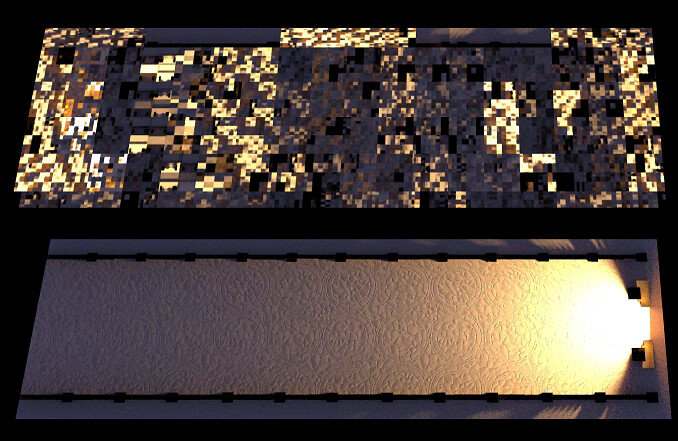
I am encountering a persistent issue with lightmaps not using UV1 or UV2 when assigned to a MeshStandardMaterial. My geometry contains:
-
correct uv
-
correct uv1
-
I also manually create uv2 from uv1 to match Three.js requirements
However, MeshStandardMaterial’s lightMap is never mapped correctly.
The strange part is that if I use a custom ShaderMaterial and manually sample the lightmap using uv1, the mapping is perfect, which confirms:
-
my UV1 unwrap is correct
-
the lightmap texture is correct
-
there is no mismatch in texel density
-
geometry attributes are correct and aligned
This leads me to believe that Three.js is doing something internally that prevents my UV1/UV2 from being used as expected.
Below are details and code.
import { BackSide, Color, Float32BufferAttribute, Mesh, MeshBasicMaterial, MeshStandardMaterial, ShaderMaterial, SphereGeometry } from "three";
import { GlobalUniforms } from "../../../Utils/Globals/GlobalUniforms";
import { Globals } from "../../../Utils/Globals/Globals";
import { ASSETS } from "../../../config";

export class StoneFloor {
    constructor(scene) {
        this.scene = scene

        this.ready = new Promise(resolve => {
            this.isReady = resolve
        })

        this.init()
    }

    async init() {
        const geom = await Globals.loading.modelLoader.load(ASSETS.models.ch1.drc.floor)

        const color = Globals.loading.loadTexture.load(ASSETS.textures.ch1.floor.baseColor, "srgb-repeat");
        const roughness = Globals.loading.loadTexture.load(ASSETS.textures.ch1.floor.roughness, "linear-repeat");
        const height = Globals.loading.loadTexture.load(ASSETS.textures.ch1.floor.height, "linear-repeat");
        const normal = Globals.loading.loadTexture.load(ASSETS.textures.ch1.floor.normal, "linear-repeat");

        // did this in case using uv2 internally, so geometry now have both uv1 and uv2.
        geom.setAttribute('uv2',new Float32BufferAttribute(geom.attributes.uv1.array,2));


        Globals.textureHelper.inspectTexture(this.scene.lightmap, {
            id: 'lightmap-texture',
            position: 'top-right',
            size: 250,
            borderColor: '#ff0000'
        });

        Globals.textureHelper.debugUVIsland(this.scene.lightmap, geom, 'uv1', {
           id: 'lightmap-uv-island',
            position: 'top-left',
            size: 250,
            borderColor: '#fff200ff',
            uvColor: '#ff8800ff',
            uvLineWidth: 1,
            vertexColor: '#1100ffff',
            vertexSize: 1,
            flipY: false  // Match Blender UV space
        });

        await Promise.all([
            color._loaded,
            roughness._loaded,
            height._loaded,
            normal._loaded
        ]);

        const mat = new MeshStandardMaterial({
            map: color,
            displacementMap: height,
            displacementScale:0.1,
            aoMapIntensity: 1.0,
            roughnessMap: roughness,
            normalMap: normal,
            metalness: 0.0,
            roughness: 1.0,
            lightMap: this.scene.lightmap,
            lightMapIntensity: 1,
        })

        this.mesh = new Mesh(geom, mat);
        this.mesh.name = "floor_ch#1";
        this.mesh.position.y = -2.5
        this.mesh.updateMatrixWorld(true);
        this.mesh.matrixAutoUpdate = false;
        this.mesh.receiveShadow = false;
        this.mesh.castShadow = false;
        this.scene.add(this.mesh);
        this.isReady();

        Globals.guiHelper && this.initGUIConfig(Globals.guiHelper, 1);
    }

    initGUIConfig(guiHelper, tabIndex) {

        // Mesh config
        const meshConfig = {
            position: {
                type: "vector3",
                value: { x: this.mesh.position.x, y: this.mesh.position.y, z: this.mesh.position.z },
                params: { step: 0.1 }
            },
            rotation: {
                type: "vector3",
                value: { x: this.mesh.rotation.x, y: this.mesh.rotation.y, z: this.mesh.rotation.z },
                params: { step: 0.01 }
            },
            scale: {
                type: "vector3",
                value: { x: this.mesh.scale.x, y: this.mesh.scale.y, z: this.mesh.scale.z },
                params: { min: -10, max: 10, step: 0.1 }
            }
        };

        guiHelper.addUIFolder(meshConfig, "Floor/Mesh", tabIndex, {
            target: this.mesh,
            expanded: false,
            autoSync: true,
            onUpdate: (inputName, value, target) => {
                if (inputName === 'renderOrder') {
                    target.renderOrder = value;
                }

                if (inputName === 'position' || inputName === 'rotation' || inputName === 'scale') {
                    target.updateMatrix();
                    target.updateMatrixWorld(true);
                }
            }
        });
    }
}
The result:
lightmap appears completely wrong - misaligned.
it works perfectly in shader material
       const mat = new ShaderMaterial({
            uniforms: {
                lightMap: { value:this.scene.lightmap },
                lightMapIntensity: { value: 2.0 },
                debugMode: { value: 0.0 }
            },
            vertexShader: `
                varying vec2 vUv;
                varying vec2 vUv1;

                void main() {
                    vUv = uv;

                    #ifdef USE_UV1
                        vUv1 = uv1;
                    #else
                        vUv1 = uv;
                    #endif

                    gl_Position = projectionMatrix * modelViewMatrix * vec4(position, 1.0);
                }
            `,
            fragmentShader: `
                uniform sampler2D lightMap;
                uniform float lightMapIntensity;
                uniform float debugMode;

                varying vec2 vUv;
                varying vec2 vUv1;

                void main() {
                    // Debug mode 1: Visualize UV1 coordinates
                    if (debugMode > 0.5 && debugMode < 1.5) {
                        gl_FragColor = vec4(vUv1.x, vUv1.y, 0.0, 1.0);
                        return;
                    }

                    // Debug mode 2: Show UV bounds + sampled color info
                    if (debugMode > 1.5) {
                        float outOfBounds = step(1.0, vUv1.x) + step(vUv1.x, 0.0) +
                                           step(1.0, vUv1.y) + step(vUv1.y, 0.0);
                        if (outOfBounds > 0.5) {
                            gl_FragColor = vec4(1.0, 0.0, 0.0, 1.0);  // Red for out of bounds
                            return;
                        }

                        // Show the actual sampled color to debug black faces
                        vec3 sampledColor = texture2D(lightMap, vUv1).rgb;
                        float brightness = (sampledColor.r + sampledColor.g + sampledColor.b) / 3.0;

                        // If very dark, show it in blue to identify the issue
                        if (brightness < 0.01) {
                            gl_FragColor = vec4(0.0, 0.0, 1.0, 1.0);  // Blue for black samples
                            return;
                        }

                        gl_FragColor = vec4(sampledColor, 1.0);  // Show actual sampled color
                        return;
                    }

                    // Normal mode: Sample lightmap
                    vec3 lightMapColor = texture2D(lightMap, vUv1).rgb;
                    vec3 baseColor = vec3(1.0);
                    vec3 finalColor = baseColor * lightMapColor * lightMapIntensity;

                    // Add small ambient so it's never completely black (helps debugging)
                    finalColor += vec3(0.001);

                    gl_FragColor = vec4(finalColor, 1.0);
                }
            `,
            defines: {
                USE_UV1: geom.attributes.uv1 !== undefined
            },
            side: DoubleSide
        });
This tells me that:
- UV1 in the geometry is correct
- the lightmap texture is correct
- the baking in Blender is correct
- the issue exists only inside MeshStandardMaterial’s internal pipeline
Any insight, guidance, or debugging ideas would be greatly appreciated.
I have been stuck on this for days, and since the ShaderMaterial works perfectly, I know the issue is not with my geometry.
Thank you in advance.