Hi all, first post here.
My partner makes pottery and I look after our little shop website. We’d like a simple three.js viewer on each product page so people can spin a mug or bowl around before buying. The viewer part I can manage (GLTFLoader + OrbitControls from the examples works fine with a test model). The part I’m stuck on is getting the actual pieces into 3D.
Every piece is unique and we list around 15 new ones a month, so paying someone to model each one isn’t realistic. What we have:
- for new pieces: about 24 turntable photos each, white background, consistent lighting
- for older pieces that already sold: often only 3 or 4 photos
Questions:
- Most pieces are glazed and a bit glossy. Is turntable photogrammetry realistic for that, or will the reflections ruin it? Would a matte spray (that washes off) be the usual trick?
- For the pieces with only a handful of photos, is there any sensible way to get a plausible mesh, or should we just stick to photos for those?
- What would you aim for per GLB if the page has to load quickly on phones? Rough triangle count and texture size. And is KTX2 worth learning as a beginner, or is Draco/meshopt plus a 1k JPG texture good enough?
If anyone has built something similar, I’d love to hear what your asset pipeline looked like. Thanks!
Update: thanks for the replies! I tested a few image-to-3D options on our pieces and SupaVoxel turned out to be the best solution for us: one product photo in, a textured GLB out in a few minutes, and the glossy glaze comes through instead of looking melted. Even pieces that already sold, where we only had 3 or 4 photos, worked from a single shot.
Here’s one of the test mugs if you want to spin it around: 3D Model Viewer
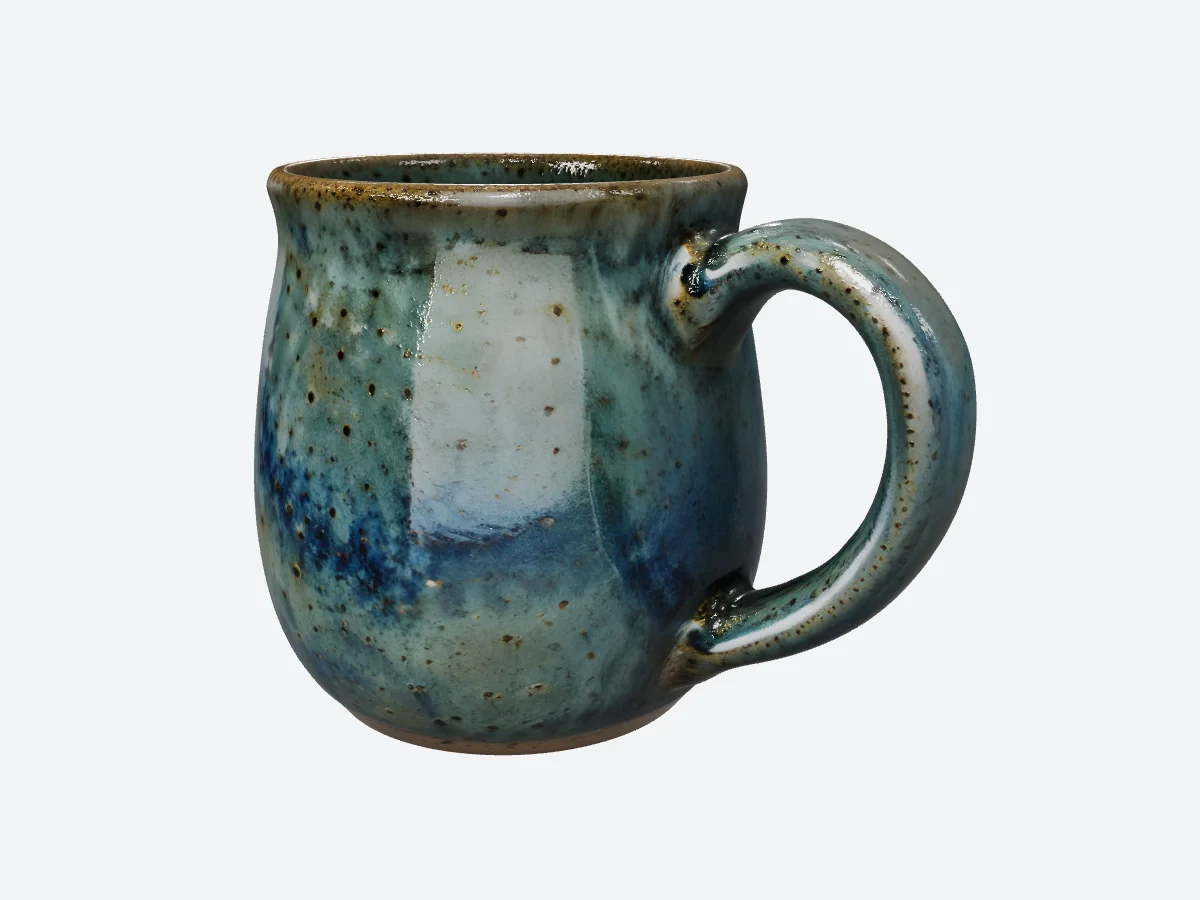
I’d recommend it to anyone with the same “every piece is unique, all we have is photos” problem. If you’re interested, have a look at the model above and see how it holds up. Still happy to hear tips on keeping the GLBs small for the product page.
-
Gloss and matte will mess up photoscans. You may be able to use a image->mesh service like meshy or tripoai, to go from 1 or 2 images to a mesh, but they still may require some cleanup.
You may get around this with a really diffuse lighting setup, or a very simple lighting setup to provide simple enough cues to the photoscan software but I haven’t used this path in a while.
-
see above ^
-
For this, you will probably be more limited by the size of the .glb and how fast that downloads.
If its an item per page you can get away with a bit larger.. if you intend to have 5-10 items per page, they’ll need to be smaller. I would aim for somewhere around 1->few megabytes per object if potentially showing multiple on the page.
Rough triangle counts, < 1million per.. texture size ~<2048x2048 (this often dominates the size of the file)
You don’t really need to learn much for ktx2.. you can use a tool like meshopt, or gltf-transform, to auto convert your full size glb from your mesh generation process, into something optimized for web.. then for loading, you just add the ktx2 and/or meshopt plugins to your glb loader, similarly to how its done with Draco. But yeah If you have 1k jpgs, already, that may be reasonable optimal already. I’ve done a lot of this kind of stuff before. Feel free to DM me if more questions about it.
p.s.-just remembered this post I saw yesterday here, for a web based asset cruncher posted by another forum member: I built a browser-based GLB compressor — demo reduced from 3.14 MB to 489.58 KB - #4 by manthrax Might be an easy way to experiment with different compression quickly online. (I have not used that compressor specifically but thought i’d throw it out there. I myself usually either use the blender gltf exporters built in draco export + jpg|webp textures.. or if I’m really crushing, meshopt from the commandline with a script to automate it if I have to reprocess occasionally.)
SupaVoxel is a solid find for one-off pieces. Watch what comes out the other end though - voxel-to-GLB converters routinely blow up vertex counts (every little cube wants its own faces), and the baked textures tend to ship at 4096px, so your spin-a-mug viewer can hit 40+ MB per product before you notice. Two fixes usually get it under control: run gltf-transform weld + simplify to merge duplicate verts and decimate, and downsize textures to 2048. Most mugs land around 1-3 MB after that and nobody can tell the difference on a product page.
One photography tip since these are one-of-a-kind: a cheap turntable + your phone in video mode, pull 60-80 frames, feed them through WebODM (free) or RealityScan - for curved glazed surfaces that usually beats voxel conversion, and pottery is mostly curved glazed surfaces.
I ended up writing a small audit CLI for GLB delivery budgets after our own product-page models got heavy (triangle/texture caps, exit codes) - happy to run one of your converted mugs through it if you want a second opinion.